

There are three methods for displaying formulas in Wikipedia: raw HTML, HTML with math templates (abbreviated here as {{math}}), and a subset of LaTeX implemented with the HTML markup <math></math> (referred to as MediaWiki software. The Manual of Style Mathematics has not always evolved accordingly. So the how-to recommendations that appear below may differ from those of the Manual of Style. In this case, they express a consensus resulting of the practice of the most experienced members of WikiProject Mathematics and many discussions at Wikipedia talk:WikiProject Mathematics.
For example, the famous Einstein formula can be entered with:
- Raw HTML:
{{nowrap|''E'' {{=}} ''mc''<sup>2</sup>}}, which is rendered as E = mc2- The template {{nowrap}} is used here only for avoiding a line break inside the formula.
- {{math}}:
{{math|''E'' {{=}} ''mc''{{sup|2}}}}, which is rendered as E = mc2 - LaTeX:
<math>E=mc^2</math>, which is rendered as

Use of raw HTML
Variable names and many symbols appear very different to the reader when raw HTML is used compared to the other rendering methods. This may be confusing in the common case where several methods are used in the same article. Moreover, mathematicians who are used to reading and writing texts written with LaTeX often find the raw HTML rendering awful.
So, raw HTML should normally not be used for new content. However, raw HTML is still present in many mathematical articles. It is generally a good editing practice to convert it to {{math}} format, but consistency must be respected; that is, such a conversion must be done in a whole article, or at least in a whole section. Moreover, such a conversion must be identified as such in the edit summary, and making other changes in the same edit should be avoided. This is to help other users identify changes that are possibly controversial (the "diff" of a conversion may be very large, and may hide other changes).
Converting raw HTML to {{math}} is rather simple: when the formula is enclosed with {{nowrap}}, it suffices to change "nowrap" into "math". However, if the formula contains an equal sign, one has to add 1= just before the formula for avoiding confusion with the template syntax; for example, {{math|1=''E'' = ''mc''{{sup|2}}}}. Also, vertical bars (|), if any, must either be replaced with {{!}} or avoided by using {{abs}}.
LaTeX vs. {{math}}
Both accepted by MOS:MATH, these two methods of writing mathematical expressions—using {{math}} and LaTeX—have both advantages and disadvantages. The visual rendering of variable names is largely consistent between them, and displaying variables within the same paragraph using either method generally does not cause formatting issues.
The disadvantages of LaTeX include:
- On some browser configurations, LaTeX inline formulas appear with a slight vertical misalignment, or with a font size that may be slightly different from that of the surrounding text. This is not a problem with a block displayed formula, and also typically not with inline formulas that exceed the normal line height marginally (for example, formulas with subscripts and superscripts).
- The use of LaTeX in a piped link or in a section heading does not appear in blue in the linked text or the table of contents. Moreover, links to section headings containing LaTeX formulas do not always work as expected.
- Finally, having many LaTeX formulas may significantly increase the processing time of a page. LaTeX formulas should be avoided in image captions or footnotes, because when the image is clicked for a larger display or a footnote is selected on a mobile device, LaTeX in the caption or footnote will not render.
Disadvantages of {{math}} include:
- not all formulas can be displayed,
- complicated formulae may be poorly rendered,
- except for the most common symbols such as letters, numerals, and basic punctuation, rendering of Unicode mathematical symbols can be inconsistent in size or alignment where fallback fonts do not match,
- some readers may not have any font which includes certain uncommon symbols,
- spaces within a formula must be directly managed (for example, by including explicit hair or thin spaces),
- variable names must be italicized explicitly, and superscripts and subscripts must use an explicit tag or template, and
- except for short formulas, the source of a formula typically has more markup overhead and can be difficult to read.
The common practice of most members of WikiProject Mathematics is the following:
- Use of {{mvar}} and {{math}} for isolated variables and {{math}} for simple inline formulas; or alternately the use of LaTeX for these purposes (optionally using the {{tmath}} template), especially on articles with many complex formulas or where rendering seems inconsistent
- Use of {{mvar}} and {{math}} for formulas in image captions, even if the rendering is mediocre
- Use of LaTeX for separately displayed formulas and more complicated inline formulas
- Use of LaTeX for formulas involving symbols that are not regularly rendered in Unicode (see Manual of Style/Mathematics § Blackboard bold)
- Avoid formulas in section headings, and when this is necessary, use raw HTML (see Finite field § GF(p2) for an odd prime p for an example)
The choice between {{math}} and LaTeX depends on the editor. Converting a page from one format to another must be done with stronger reasons than editor preference.
Display format of LaTeX
By default SVG images with non-visible MathML are generated. The text-only form of the LaTeX can be set via Preferences → Appearance → Math.
The hidden MathML can be used by screen readers and other assistive technology. In Firefox, to display the MathML:
- Install the Native MathML extension
- Or copy its CSS rules to your User/common.css.
In either case, you must have fonts that support MathML (see Mozilla Fonts for MathML) installed on your system. For copy-paste support in Firefox, you can also install MathML Copy.
Spaces and ordinary text
Formulas using multiple words and hyphens are not functional in <math>. For example, this code, which gives a simple formula for calculating pollution risks:
Risk = \frac{Measured environmental concentration}{Predicted no-effect concentration}
produces this unreadable result:

A possible workaround is the use of \text:
\text{Risk} = \frac{\text{Measured environmental concentration}}{\text{Predicted no-effect concentration}}
which produces:

Use of HTML templates
TeX (LaTeX) markup is not the only way to render mathematical formulas. For simple inline formulas, the template {{math}} and its associated templates are often preferred. The following comparison table shows that similar results can be achieved with the two methods.
| LaTeX syntax | LaTeX rendering | HTML syntax | HTML rendering | |
|---|---|---|---|---|
<math>\alpha</math> | {{math|''α''}} or {{mvar|α}} |
α or α | ||
<math>f(x) = x^2</math> | {{math|1=''f''(''x'') = ''x''<sup>2</sup>}} | f(x) = x2 | ||
<math>\{1,e,\pi\}</math> | {{math|{{mset|1, ''e'', ''π''}}}} |
{1, e, π} | ||
<math>|z| \leq 2</math> | {{math|{{abs|''z''}} ≤ 2}} |
|z| ≤ 2 | ||


Here is a summary of the mathematical templates:
Math templates | |||||||||||||||||||||||||||||||||||||||||||||||||
|---|---|---|---|---|---|---|---|---|---|---|---|---|---|---|---|---|---|---|---|---|---|---|---|---|---|---|---|---|---|---|---|---|---|---|---|---|---|---|---|---|---|---|---|---|---|---|---|---|---|
| |||||||||||||||||||||||||||||||||||||||||||||||||
| |||||||||||||||||||||||||||||||||||||||||||||||||
| |||||||||||||||||||||||||||||||||||||||||||||||||
| |||||||||||||||||||||||||||||||||||||||||||||||||

When writing sets or expressions involving braces, vertical bars, or equal signs within {{math}}, care is required, as these characters can conflict with template syntax. To avoid such issues:
- Use {{mset}} to safely enclose elements in curly braces ({})
- Use {{abs}} to wrap values in absolute value bars (| · |), avoiding parser function confusion with template pipes.
- For a single vertical bar (|), use
{{!}}. - For an equal sign (=) within template parameters, use
{{=}}.
HTML entities
Though Unicode characters are generally preferred, sometimes HTML entities are needed to avoid problems with wikitext or confusion with other characters:
| < | > | − | • | ′ | ″ | ⋅ | · | – | — |
| < | > | − | • | ′ | ″ | ⋅ | · | – | — |
In the table below, the HTML syntax on the left produces the symbols on the right, but these symbols can also be entered directly into the wikitext either by typing them if they are available on the keyboard, by copy-pasting them, or by using the special character button ( ) in the toolbar. (When editing any Wikipedia page in a desktop web browser, use the "Insert" pulldown menu immediately below the article text, or the "Special characters" menu immediately above the article text.) Normally, lowercase Greek letters should be entered in italics, that is, enclosed between two single quotes (for example,
''β'').
| HTML syntax | Rendering |
|---|---|
α β γ δ ε ζ η θ ι κ λ μ ν ξ ο π ρ σ ς τ υ φ χ ψ ω |
α β γ δ ε ζ |
Γ Δ Θ Λ Ξ Π Σ Φ Ψ Ω |
Γ Δ Θ Λ Ξ Π |
∫ ∑ ∏ − ± ∞ ≈ ∝ = ≡ ≠ ≤ ≥ × · ⋅ ÷ ∂ ′ ″ ∇ ‰ ° ∴ ∅ |
∫ ∑ ∏ − ± ∞ |
∈ ∉ ∩ ∪ ⊂ ⊃ ⊆ ⊇ ¬ ∧ ∨ ∃ ∀ ⇒ ⇔ → ↔ ↑ ↓ ℵ - – — |
∈ ∉ ∩ ∪ ⊂ ⊃ ⊆ ⊇ |
Superscripts and subscripts
| x2 | x3 | x2 1 |
x<sup>2</sup> | x<sub>3</sub> | x{{su|b=1|p=2|lh=1}} |
Spacing
To avoid line-wrapping in the middle of a formula, use {{math}}. If necessary, a non-breaking space ( ) can be inserted with . When an inline formula is long enough, it can be helpful to allow it to break across lines. Whether using LaTeX or templates, split the formula at each acceptable breakpoint into separate <math> tags or {{math}} templates with any binary relations or operators and intermediate whitespace included at the trailing end rather than leading end of a part.
Typically whitespace should be a regular space ( ) or none at all. In rare circumstances, such as where one character overlaps another due to one being in italics, a thin space can be added with {{thin space}}.
Additional
For more on Wikipedia how-tos and math style guidelines, see:
- MOS:FRAC for how to input fractions in various circumstances
- MOS:RADICAL for how to square and other roots in various circumstances
- Per MOS:ELLIPSIS, "..." (three ASCII periods) is used instead of "…" (single character)
- Arrow (symbol) § Arrows in Unicode
- Mathematical operators and symbols in Unicode
- Wikipedia:Manual of Style/Mathematics
For more on special characters:
- Unicode character name index can be used to find the Unicode number of a character.
- W3C list of MathML characters indexed by code or by name
- List of XML and HTML character entity references – includes all named entities
- Glossary of mathematical symbols
LaTeX basics
Math markup goes inside <math>...</math>. Chemistry markup goes inside <math chem>...</math> or <chem>...</chem>. {{tmath|...}} can be used in place of <math>...</math> to avoid line-wrapping of adjacent text (with caveats). All these tags use TeX.
The now deprecated tag <ce> was considered too ambiguous, and it has been replaced by <chem>.[1]
LaTeX commands
LaTeX commands are case-sensitive, and take one of the following two formats:
- They start with a backslash
\and then have a name consisting of letters only. Command names are terminated by a space, a number or any other "non-letter" character. - They consist of a backslash
\and exactly one non-letter.
Some commands need an argument, which has to be given between curly braces {} after the command name. Some commands support optional parameters, which are added after the command name in square brackets []. The general syntax is:
\commandname[option1,option2,...]{argument1}{argument2}...
Special characters
The following symbols are reserved characters that either have a special meaning under LaTeX or are unavailable in all the fonts. If you enter them directly in your text, they will normally not render, but rather do things you did not intend.
# $ % ^ & _ { } ~ \
These characters can be entered by prefixing the escape character backslash \ or using special sequences:
\# \$ \% ^\wedge \& \_ \{ \} \sim \backslash
yielding:
Spaces
"Whitespace" characters, such as blank or tab, are treated uniformly as "space" by LaTeX. Several consecutive whitespace characters are treated as one "space". See § Spacing for commands that produce spaces of different size.
Vertical spacing is accomplished via an optional parameter passed to the terminate line command, \\, passing it a number of units and the name of a unit; for example, \\[0.6mu] is 0.6 "mu" units. Not all LaTeX units are available; available options are:
| Type | Unit | Definition | Notes | Demonstration |
|---|---|---|---|---|
| Relative | em | Current font's total height. |
| |
| mu | em/18 | |||
| ex | Current font's x-height. | Not the height of an x. | ||
| Absolute | in | 1 inch |
| |
| pc | 12in/72.27 | Smaller than 1 pica. | ||
| pt | in/72.27 | Smaller than 1 point. | ||
| cm | in/2.54 | |||
| mm | in/25.4 |
![{\displaystyle {\begin{aligned}{\underline {}}{\underline {}}{\underline {}}\\[1mu]{\text{mu}}\end{aligned}}}](https://wikimedia.org/api/rest_v1/media/math/render/svg/33ba7931a44309ad18e82c16977426739925f2ae)
![{\displaystyle {\begin{aligned}{\underline {}}{\underline {}}\\[1ex]{\text{ex}}\end{aligned}}}](https://wikimedia.org/api/rest_v1/media/math/render/svg/aca6bf5b41b7c8cbf416558e0be42193d5cefad9)
![{\displaystyle {\begin{aligned}{\underline {}}{\underline {}}{\underline {}}\\[1em]{\text{em}}\end{aligned}}}](https://wikimedia.org/api/rest_v1/media/math/render/svg/0dd5169e608c37813b03f0c104c0c58ff03b430b)
![{\displaystyle {\begin{aligned}{\underline {}}{\underline {}}\\[1pt]{\text{pt}}\end{aligned}}}](https://wikimedia.org/api/rest_v1/media/math/render/svg/f1d884a8324979ce39e6a8668f14af152b9b929f)
![{\displaystyle {\begin{aligned}{\underline {}}{\underline {}}{\underline {}}\\[1mm]{\text{mm}}\end{aligned}}}](https://wikimedia.org/api/rest_v1/media/math/render/svg/b15e84da589592615e88ed65f3a992b652806907)
![{\displaystyle {\begin{aligned}{\underline {}}{\underline {}}\\[1pc]{\text{pc}}\end{aligned}}}](https://wikimedia.org/api/rest_v1/media/math/render/svg/b1ef916759c58e190fd82be279b786678f1b050a)
![{\displaystyle {\begin{aligned}{\underline {}}{\underline {}}{\underline {}}\\[1cm]{\text{cm}}\end{aligned}}}](https://wikimedia.org/api/rest_v1/media/math/render/svg/5a789611b4e3f232cf5aa9c9bbd2cf6d6bb5fcaf)
![{\displaystyle {\begin{aligned}{\underline {}}{\underline {}}\\[1in]{\text{in}}\end{aligned}}}](https://wikimedia.org/api/rest_v1/media/math/render/svg/64cfbbc173194b6fed71b7a8c276020bf174ad33)
LaTeX environments
Environments in LaTeX have a role that is quite similar to commands, but they usually have effect on a wider part of formula. Their syntax is:
 \begin{environmentname}
   text to be influenced
 \end{environmentname}
Environments supported by Wikipedia include matrix, align, etc. See § Fractions, matrices, multilines.
Rendering
The font sizes and types are independent of browser settings or CSS. Font sizes and types will often deviate from what HTML renders. Vertical alignment with the surrounding text can also be a problem; a work-around is described in § Alignment with normal text flow. The CSS selector of the images is img.tex.
Apart from function and operator names, as is customary in mathematics, variables and letters are in italics; digits are not. For other text, (like variable labels) to avoid being rendered in italics like variables, use \text or \mathrm (formerly \rm). You can also define new function names using \operatorname{...}. For example, \text{abc} gives . \operatorname{...} provides spacing before and after the operator name when appropriate, as when a\operatorname{sn}b is rendered as (with space to the left and right of "sn") and a\operatorname{sn}(b+c) as (with space to the left and not to the right). LaTeX's starred version, \operatorname* is not supported, but a workaround is to add \limits instead. For example, \operatorname{sn}_{b>c}(b+c) \qquad \operatorname{sn}\limits_{b>c}(b+c) renders as:



LaTeX does not have full support for Unicode characters, and not all characters render. Most Latin characters with accents render correctly. However some do not, in particular those that include multiple diacritics (e.g. with Latin letters used in Vietnamese) or that cannot be precomposed into a single character (such as the uppercase Latin letter W with ring W̊), or that use other diacritics (like the ogonek or the double grave accent, used in Central European languages like Polish, or the horn attached above some vowels in Vietnamese), or other modified letter forms (used in IPA notations, African languages, or in medieval texts), some digram ligatures (like IJ in Dutch), or Latin letters borrowed from Greek, or small capitals, as well as superscripts and subscript letters. For example, \text{ð} and \text{þ} (used in Icelandic) will give errors.
The normal way of entering quotation marks in text mode (two back ticks for the left and two apostrophes for the right), such as \text{a ``quoted'' word} will not work correctly. As a workaround, you can use the Unicode left and right quotation mark characters, which are available from the special characters button (), or "Symbols" dropdown panel beneath the editor: \text{a “quoted” word}.
Force-rerendering of formulas
MediaWiki stores rendered formulas in a cache so that the images of those formulas do not need to be created each time the page is opened by a user. To force the rerendering of all formulas of a page, you must open it with the getter variables action=purge&mathpurge=true. Imagine for example there is a wrong rendered formula in the article Integral. To force the re-rendering of this formula you need to open the URL:
https://en.wikipedia.org/w/index.php?title=Integral&action=purge&mathpurge=true
Afterwards you need to bypass your browser cache, so that the new created images of the formulas are actually downloaded.
Formatting using LaTeX
Functions, symbols, special characters
Accents and diacritics | |
|---|---|
\dot{a}, \ddot{a}, \acute{a}, \grave{a} |
|
\check{a}, \breve{a}, \tilde{a}, \bar{a} |
|
\hat{a}, \widehat{a}, \vec{a} |
|
Standard numerical functions | |
\exp_a b = a^b, \exp b = e^b, 10^m |
|
\ln c = \log c, \lg d = \log_{10} d |
|
\sin a, \cos b, \tan c, \cot d, \sec f, \csc g |
|
\arcsin h, \arccos i, \arctan j |
|
\sinh k, \cosh l, \tanh m, \coth n |
|
\operatorname{sh}k, \operatorname{ch}l, \operatorname{th}m, \operatorname{coth}n |
|
\operatorname{argsh}o, \operatorname{argch}p, \operatorname{argth}q |
|
\sgn r, \left\vert s \right\vert |
|
\min(x,y), \max(x,y) |
|
Bounds | |
\min x, \max y, \inf s, \sup t |
|
\lim u, \liminf v, \limsup w |
|
\dim p, \deg q, \det m, \ker\phi |
|
\injlim, \varinjlim, \projlim, \varprojlim |
|
Projections | |
\Pr j, \hom l, \lVert z \rVert, \arg z |
|
Differentials and derivatives | |
dt, \mathrm{d}t, \partial t, \nabla\psi |
|
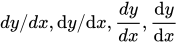
dy/dx, \mathrm{d}y/\mathrm{d}x, \frac{dy}{dx}, \frac{\mathrm{d}y}{\mathrm{d}x} |
|
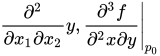
\frac{\partial^2}{\partial x_1\partial x_2}y, \left.\frac{\partial^3 f}{\partial^2 x \partial y}\right\vert_{p_0} |
|
\prime, \backprime, f^\prime, f', f'', f^{(3)}, \dot y, \ddot y |
|
Letter-like symbols or constants | |
\infty, \aleph, \complement, \backepsilon, \eth, \Finv, \hbar, \N, \R, \Z, \C, \Q |
|
\Im, \imath, \jmath, \Bbbk, \ell, \mho, \wp, \Re, \circledS, \S, \P, \AA |
|
Modular arithmetic | |
s_k \equiv 0 \pmod{m} |
|
a \bmod b |
|
\gcd(m, n), \operatorname{lcm}(m, n) |
|
\mid, \nmid, \shortmid, \nshortmid |
|
Radicals | |
\surd, \sqrt{2}, \sqrt[n]{2}, \sqrt[3]{\frac{x^3+y^3}{2}} |
|
Operators | |
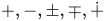
+, -, \pm, \mp, \dotplus |
|
\times, \div, \divideontimes, /, \backslash |
|
\cdot, * \ast, \star, \circ, \bullet |
|
\boxplus, \boxminus, \boxtimes, \boxdot |
|
\oplus, \ominus, \otimes, \oslash, \odot |
|
\circleddash, \circledcirc, \circledast |
|
\bigoplus, \bigotimes, \bigodot |
|
Sets | |
\{ \}, \O \empty \emptyset, \varnothing |
|
\in, \notin \not\in, \ni, \not\ni |
|
\cap, \Cap, \sqcap, \bigcap |
|
\cup, \Cup, \sqcup, \bigcup, \bigsqcup, \uplus, \biguplus |
|
\setminus, \smallsetminus, \times |
|
\subset, \Subset, \sqsubset |
|
\supset, \Supset, \sqsupset |
|
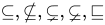
\subseteq, \nsubseteq, \subsetneq, \varsubsetneq, \sqsubseteq |
|
\supseteq, \nsupseteq, \supsetneq, \varsupsetneq, \sqsupseteq |
|
\subseteqq, \nsubseteqq, \subsetneqq, \varsubsetneqq |
|
\supseteqq, \nsupseteqq, \supsetneqq, \varsupsetneqq |
|
Relations | |
=, \ne, \neq, \equiv, \not\equiv |
|
\doteq, \doteqdot, \mathrel{\overset{\underset{\mathrm{def}}{}}=}, \mathrel{\stackrel{\mathrm{def}}=}, := |
|
\sim, \nsim, \backsim, \thicksim, \simeq, \backsimeq, \eqsim, \cong, \ncong |
|
\approx, \thickapprox, \approxeq, \asymp, \propto, \varpropto |
|
<, \nless, \ll, \not\ll, \lll, \not\lll, \lessdot |
|
>, \ngtr, \gg, \not\gg, \ggg, \not\ggg, \gtrdot | |
\le, \leq, \lneq, \leqq, \nleq, \nleqq, \lneqq, \lvertneqq |
|
\ge, \geq, \gneq, \geqq, \ngeq, \ngeqq, \gneqq, \gvertneqq |
|
\lessgtr, \lesseqgtr, \lesseqqgtr, \gtrless, \gtreqless, \gtreqqless |
|
\leqslant, \nleqslant, \eqslantless |
|
\geqslant, \ngeqslant, \eqslantgtr |
|
\lesssim, \lnsim, \lessapprox, \lnapprox |
|
\gtrsim, \gnsim, \gtrapprox, \gnapprox |
|
\prec, \nprec, \preceq, \npreceq, \precneqq |
|
\succ, \nsucc, \succeq, \nsucceq, \succneqq |
|
\preccurlyeq, \curlyeqprec |
|
\succcurlyeq, \curlyeqsucc |
|
\precsim, \precnsim, \precapprox, \precnapprox |
|
\succsim, \succnsim, \succapprox, \succnapprox |
|
Geometric | |
\parallel, \nparallel, \shortparallel, \nshortparallel |
|
\perp, \angle, \sphericalangle, \measuredangle, 45^\circ for degrees |
|
\Box, \square, \blacksquare, \diamond, \Diamond, \lozenge, \blacklozenge, \bigstar |
|
\bigcirc, \triangle, \bigtriangleup, \bigtriangledown |
|
\vartriangle, \triangledown |
|
\blacktriangle, \blacktriangledown, \blacktriangleleft, \blacktriangleright |
|
Logic | |
\forall, \exists, \nexists |
|
\therefore, \because, \And |
|
\lor, \vee, \curlyvee, \bigvee
don't use |
|
\land, \wedge, \curlywedge, \bigwedge
don't use |
|
\lnot, \neg, \not\operatorname{R}, \bot, \top |
|
\vdash, \dashv, \vDash, \Vdash, \models |
|
\Vvdash, \nvdash, \nVdash, \nvDash, \nVDash |
|
\ulcorner, \urcorner, \llcorner, \lrcorner |
|
Arrows | |
\Rrightarrow, \Lleftarrow |
|
\Rightarrow, \nRightarrow, \Longrightarrow, \implies |
|
\Leftarrow, \nLeftarrow, \Longleftarrow |
|
\Leftrightarrow, \nLeftrightarrow, \Longleftrightarrow, \iff |
|
\Uparrow, \Downarrow, \Updownarrow |
|
\rightarrow, \to, \nrightarrow, \longrightarrow |
|
\leftarrow, \gets, \nleftarrow, \longleftarrow |
|
\leftrightarrow, \nleftrightarrow, \longleftrightarrow |
|
\uparrow, \downarrow, \updownarrow |
|
\nearrow, \swarrow, \nwarrow, \searrow |
|
\mapsto, \longmapsto |
|
\rightharpoonup \rightharpoondown \leftharpoonup \leftharpoondown \upharpoonleft \upharpoonright \downharpoonleft \downharpoonright \rightleftharpoons \leftrightharpoons |
|
\curvearrowleft \circlearrowleft \Lsh \upuparrows \rightrightarrows \rightleftarrows \rightarrowtail \looparrowright |
|
\curvearrowright \circlearrowright \Rsh \downdownarrows \leftleftarrows \leftrightarrows \leftarrowtail \looparrowleft |
|
\hookrightarrow \hookleftarrow \multimap \leftrightsquigarrow \rightsquigarrow \twoheadrightarrow \twoheadleftarrow |
|
Special | |
\amalg \P \S \% \dagger \ddagger \ldots \cdots \vdots \ddots |
|
\smile \frown \wr \triangleleft \triangleright |
|
\diamondsuit, \heartsuit, \clubsuit, \spadesuit, \Game, \flat, \natural, \sharp |
|
Unsorted (new stuff) | |
\diagup \diagdown \centerdot \ltimes \rtimes \leftthreetimes \rightthreetimes |
|
\eqcirc \circeq \triangleq \bumpeq \Bumpeq \doteqdot \risingdotseq \fallingdotseq |
|
\intercal \barwedge \veebar \doublebarwedge \between \pitchfork |
|
\vartriangleleft \ntriangleleft \vartriangleright \ntriangleright |
|
\trianglelefteq \ntrianglelefteq \trianglerighteq \ntrianglerighteq |
|























![{\displaystyle \surd ,{\sqrt {2}},{\sqrt[{n}]{2}},{\sqrt[{3}]{\frac {x^{3}+y^{3}}{2}}}}](https://wikimedia.org/api/rest_v1/media/math/render/svg/fb2f06b0dec0a42806cf1378d9e9b64f10574c1d)










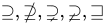










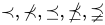
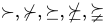







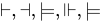














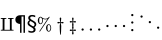




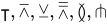


For a little more semantics on these symbols, see this brief TeX Cookbook or here TeX Cookbook.
Larger expressions
Subscripts, superscripts, integrals
| Feature | Syntax | How it looks rendered |
|---|---|---|
| Superscript | a^2, a^{x+3} | |
| Subscript | a_2 | |
| Grouping | 10^{30} a^{2+2} | |
a_{i,j} b_{f'} | ||
| Combining sub & super without and with horizontal separation | x_2^3 | |
{x_2}^3 | ||
| Super super | 10^{10^{8}} | |
| Preceding and/or additional sub & super | \sideset{_1^2}{_3^4}\prod_a^b | |
{}_1^2\!\Omega_3^4 | ||
| Stacking | \overset{\alpha}{\omega} | |
\underset{\alpha}{\omega} | ||
\overset{\alpha}{\underset{\gamma}{\omega}} | ||
\stackrel{\alpha}{\omega} | ||
| Derivatives | x', y'', f', f'' | |
x^\prime, y^{\prime\prime} | ||
| Derivative dots | \dot{x}, \ddot{x} | |
| Underlines, overlines, vectors | \hat a \ \bar b \ \vec c | |
\overrightarrow{a b} \ \overleftarrow{c d} \ \widehat{d e f} | ||
\overline{g h i} \ \underline{j k l} | ||
| Arc (workaround) | \overset{\frown} {AB} | |
| Arrows | A \xleftarrow{n+\mu-1} B \xrightarrow[T]{n\pm i-1} C | |
| Overbraces | \overbrace{ 1+2+\cdots+100 }^{5050} | |
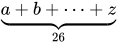
| Underbraces | \underbrace{ a+b+\cdots+z }_{26} | |
| Sum | \sum_{k=1}^N k^2 | |
Sum (force \textstyle) |
\textstyle \sum_{k=1}^N k^2 | |
Sum in a fraction (default \textstyle) |
\frac{\sum_{k=1}^N k^2}{a} | |
Sum in a fraction (force \displaystyle) |
\frac{\displaystyle \sum_{k=1}^N k^2}{a} | |
| Sum in a fraction (alternative limits style) | \frac{\sum\limits^{N}_{k=1} k^2}{a} | |
| Product | \prod_{i=1}^N x_i | |
Product (force \textstyle) |
\textstyle \prod_{i=1}^N x_i | |
| Coproduct | \coprod_{i=1}^N x_i | |
Coproduct (force \textstyle) |
\textstyle \coprod_{i=1}^N x_i | |
| Limit | \lim_{n \to \infty}x_n | |
Limit (force \textstyle) |
\textstyle \lim_{n \to \infty}x_n | |
| Integral | \int_{1}^{3}\frac{e^3/x}{x^2}\, dx | |
| Integral (alternative limits style) | \int\limits_{1}^{3}\frac{e^3/x}{x^2}\, dx | |
Integral (force \textstyle) |
\textstyle \int_{-N}^{N} e^x\,dx | |
Integral (force \textstyle, alternative limits style) |
\textstyle \int\limits_{-N}^{N} e^x\,dx | |
| Double integral | \iint_D dx\,dy | |
| Triple integral | \iiint_E dx\,dy\,dz | |
| Quadruple integral | \iiiint_F dx\,dy\,dz\,dt | |
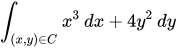
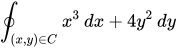
| Line or path integral | \int_{(x,y)\in C} x^3\, dx + 4y^2\, dy | |
| Closed line or path integral | \oint_{(x,y)\in C} x^3\, dx + 4y^2\, dy | |
| Intersections | \bigcap_{i=1}^n E_i | |
| Unions | \bigcup_{i=1}^n E_i |


![{\displaystyle A\xleftarrow {n+\mu -1} B{\xrightarrow[{T}]{n\pm i-1}}C}](https://wikimedia.org/api/rest_v1/media/math/render/svg/0645e6df7ace8a40eba2d92f293f5fbd6f929411)





Fractions, matrices, multilines
| Feature | Syntax | How it looks rendered |
|---|---|---|
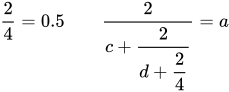
| Fractions | \frac{2}{4}=0.5 or {2 \over 4}=0.5 |
|
Small fractions (force \textstyle) |
\tfrac{2}{4} = 0.5 |
|
Large (normal) fractions (force \displaystyle) |
\dfrac{2}{4} = 0.5 \qquad \dfrac{2}{c + \dfrac{2}{d + \dfrac{2}{4}}} = a |
|
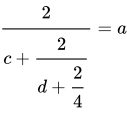
| Large (nested) fractions | \cfrac{2}{c + \cfrac{2}{d + \cfrac{2}{4}}} = a |
|
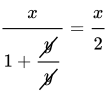
| Cancellations in fractions | \cfrac{x}{1 + \cfrac{\cancel{y}}{\cancel{y}}} = \cfrac{x}{2} |
|
| Binomial coefficients | \binom{n}{k} |
|
Small binomial coefficients (force \textstyle) |
\tbinom{n}{k} |
|
Large (normal) binomial coefficients (force \displaystyle) |
\dbinom{n}{k} |
|
| Matrices | \begin{matrix}
-x & y \\
z & -v
\end{matrix}
|
|
\begin{vmatrix}
-x & y \\
z & -v
\end{vmatrix}
|
||
\begin{Vmatrix}
-x & y \\
z & -v
\end{Vmatrix}
|
||
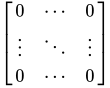
\begin{bmatrix}
0 & \cdots & 0 \\
\vdots & \ddots & \vdots \\
0 & \cdots & 0
\end{bmatrix}
|
||
\begin{Bmatrix}
x & y \\
z & v
\end{Bmatrix}
|
||
\begin{pmatrix}
x & y \\
z & v
\end{pmatrix}
|
||
\bigl( \begin{smallmatrix}
a&b\\ c&d
\end{smallmatrix} \bigr)
|
||
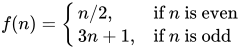
| Case distinctions | f(n) =
\begin{cases}
n/2, & \text{if }n\text{ is even} \\
3n+1, & \text{if }n\text{ is odd}
\end{cases}
|
|
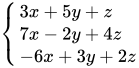
| Simultaneous equations | \begin{cases}
3x + 5y + z \\
7x - 2y + 4z \\
-6x + 3y + 2z
\end{cases}
|
|
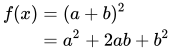
| Multiline equations | \begin{align}
f(x) & = (a+b)^2 \\
& = a^2+2ab+b^2 \\
\end{align}
|
|
\begin{alignat}{2}
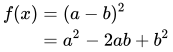
f(x) & = (a-b)^2 \\
& = a^2-2ab+b^2 \\
\end{alignat}
|
||
| Multiline equations with multiple alignments per row | \begin{alignat}{3}
f(a,b) & = (a+b)^2 && = (a+b)(a+b) \\
& = a^2+ab+ba+b^2 && = a^2+2ab+b^2 \\
\end{alignat}
|
|
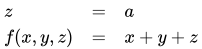
| Multiline equations (must define number of columns used ({lcl})) (should not be used unless needed) | \begin{array}{lcl}
z & = & a \\
f(x,y,z) & = & x + y + z
\end{array}
|
|
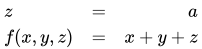
| Multiline equations (more) | \begin{array}{lcr}
z & = & a \\
f(x,y,z) & = & x + y + z
\end{array}
|
|
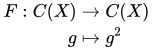
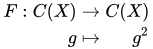
Multiline alignment using & to left align (top example) versus && to right align (bottom example) the last column |
\begin{alignat}{4}
F:\; && C(X) && \;\to\;     & C(X) \\
     && g    && \;\mapsto\; & g^2
\end{alignat}
\begin{alignat}{4}
F:\; && C(X) && \;\to\;     && C(X) \\
     && g    && \;\mapsto\; && g^2
\end{alignat}
|
|
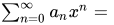
| Breaking up a long expression so that it wraps when necessary (this sometimes requires workarounds for correct spacing) |
The function <math>f</math> is defined by
<math>f(x) = {}</math><math display=inline>\sum_{n=0}^\infty a_n x^n = {}</math><math>a_0+a_1x+a_2x^2+\cdots.</math>
|
The function is defined by |
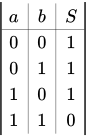
| Arrays | \begin{array}{|c|c|c|} a & b & S \\
\hline
0 & 0 & 1 \\
0 & 1 & 1 \\
1 & 0 & 1 \\
1 & 1 & 0 \\
\end{array}
|










Parenthesizing big expressions, brackets, bars
| Feature | Syntax | How it looks rendered |
|---|---|---|
| Bad ✗ | ( \frac{1}{2} )^n |
|
| Good ✓ | \left ( \frac{1}{2} \right )^n |


You can use various delimiters with \left and \right:
| Feature | Syntax | How it looks rendered |
|---|---|---|
| Parentheses | \left ( \frac{a}{b} \right ) |
|
| Brackets | \left [ \frac{a}{b} \right ] \quad\left \lbrack \frac{a}{b} \right \rbrack |
|
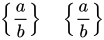
| Braces | \left \{ \frac{a}{b} \right \} \quad\left \lbrace \frac{a}{b} \right \rbrace |
|
| Angle brackets | \left \langle \frac{a}{b} \right \rangle |
|
| Bars and double bars | \left | \frac{a}{b} \right \vert \quad\left \Vert \frac{c}{d} \right \| |
|
| Floor and ceiling functions: | \left \lfloor \frac{a}{b} \right \rfloor \quad\left \lceil \frac{c}{d} \right \rceil |
|
| Slashes and backslashes | \left / \frac{a}{b} \right \backslash |
|
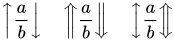
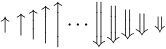
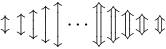
| Up, down, and up-down arrows | \left \uparrow \frac{a}{b} \right \downarrow \quad\left \Uparrow \frac{a}{b} \right \Downarrow \quad\left \updownarrow \frac{a}{b} \right \Updownarrow |
|
| Delimiters can be mixed, as long as \left and \right match |
\left [ 0,1 \right )\left \langle \psi \right | |
|
| Use \left. and \right. if you do not want a delimiter to appear |
\left . \frac{A}{B} \right \} \to X |
|
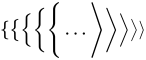
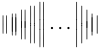
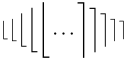
| Size of the delimiters (add "l" or "r" to indicate the side for proper spacing) | ( \bigl( \Bigl( \biggl( \Biggl( \dots \Biggr] \biggr] \Bigr] \bigr] ] |
|
\{ \bigl\{ \Bigl\{ \biggl\{ \Biggl\{ \dots\Biggr\rangle \biggr\rangle \Bigr\rangle \bigr\rangle \rangle |
||
\| \big\| \Big\| \bigg\| \Bigg\| \dots \Bigg| \bigg| \Big| \big| | |
||
\lfloor \bigl\lfloor \Bigl\lfloor \biggl\lfloor \Biggl\lfloor \dots\Biggr\rceil \biggr\rceil \Bigr\rceil \bigr\rceil \ceil |
||
\uparrow \big\uparrow \Big\uparrow \bigg\uparrow \Bigg\uparrow \dots\Bigg\Downarrow \bigg\Downarrow \Big\Downarrow \big\Downarrow \Downarrow |
||
\updownarrow \big\updownarrow \Big\updownarrow \bigg\updownarrow \Bigg\updownarrow \dots\Bigg\Updownarrow \bigg\Updownarrow \Big\Updownarrow \big\Updownarrow \Updownarrow |
||
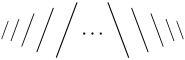
/ \big/ \Big/ \bigg/ \Bigg/ \dots\Bigg\backslash \bigg\backslash \Big\backslash \big\backslash \backslash |

![{\displaystyle \left[{\frac {a}{b}}\right]\quad \left\lbrack {\frac {a}{b}}\right\rbrack }](https://wikimedia.org/api/rest_v1/media/math/render/svg/8680e564275ad3a1c6179240f28c07f34f7b2858)




![{\displaystyle ({\bigl (}{\Bigl (}{\biggl (}{\Biggl (}\dots {\Biggr ]}{\biggr ]}{\Bigr ]}{\bigr ]}]}](https://wikimedia.org/api/rest_v1/media/math/render/svg/5d166c08a30ad598edc84d0bbe0223be8bcc5a6d)
Display attribute
The <math> tag can take a display attribute with possible values of inline and block.
Inline
If the value of the display attribute is inline, the contents will be rendered in inline mode: there will be no new paragraph for the equation and the operators will be rendered to consume only a small amount of vertical space.
The sum converges to 2;
the vertical space between lines is not disturbed by large operators.

The code for the math example reads:
<math display="inline">\sum_{i=0}^\infty 2^{-i}</math>inline are optional and display=inline is also valid.[2]
Technically, the command \textstyle will be added to the user input before the TeX command is passed to the renderer. The result will be displayed without further formatting by outputting the image or MathML element to the page.
Block
In block-style, the equation is rendered in its own paragraph and the operators are rendered consuming less horizontal space. The equation is indented.
The sum converges to 2.

It was entered as
<math display="block">\sum_{i=0}^\infty 2^{-i}</math>\displaystyle will be added to the user input (if the user input does not already contain the string \displaystyle or \align) before the TeX command is passed to the renderer. The result will be displayed in a new paragraph.
Therefore, the style of the MathImage is altered, i.e. the style attribute display: block; margin: auto; is added.
For MathML, it is ensured that display=inline is replaced by display block which produces a new paragraph.
Not specified
If nothing is specified, the equation is rendered in the same display style as "block", but without using a new paragraph. If the equation does appear on a line by itself, it is not automatically indented.
The sum converges to 2;
the vertical space between lines is disturbed by large operators.
Or:
The sum
converges to 2.
In both cases, the math is coded as:
<math>\sum_{i=0}^\infty 2^{-i}</math>Equation numbering
The templates {{NumBlk}} and {{EquationRef}} can be used to number equations. The template {{EquationNote}} can be used to refer to a numbered equation from surrounding text. For example, the following syntax:
{{NumBlk|:|<math>x^2 + y^2 + z^2 = 1</math>|{{EquationRef|1}}}}
produces the following result (note the equation number in the right margin):
| 1 |

Later on, the text can refer to this equation by its number using syntax like this:
As seen in equation ({{EquationNote|1}}), example text...
The result looks like this:
- As seen in equation (1), example text...
The equation number produced by {{EquationNote}} is a link that the user can click to go immediately to the cited equation.
Alphabets and typefaces
Texvc (used in MediaWiki 1.32 and older) cannot render arbitrary Unicode characters. Those it can handle, can be entered by the expressions below. For others, such as Cyrillic, they can be entered as Unicode or HTML entities in running text, but cannot be used in displayed formulas.[needs update]
| Greek alphabet | |
|---|---|
\Alpha \Beta \Gamma \Delta \Epsilon \Zeta \Eta \Theta |
|
\Iota \Kappa \Lambda \Mu \Nu \Xi \Omicron \Pi |
|
\Rho \Sigma \Tau \Upsilon \Phi \Chi \Psi \Omega |
|
\alpha \beta \gamma \delta \epsilon \zeta \eta \theta |
|
\iota \kappa \lambda \mu \nu \xi \omicron \pi |
|
\rho \sigma \tau \upsilon \phi \chi \psi \omega |
|
\varGamma \varDelta \varTheta \varLambda \varXi \varPi \varSigma \varPhi \varUpsilon \varOmega |
|
\varepsilon \digamma \varkappa \varpi \varrho \varsigma \vartheta \varphi |
|
| Hebrew symbols | |
\aleph \beth \gimel \daleth |
|
| Blackboard bold/scripts | |
\mathbb{ABCDEFGHI} |
|
\mathbb{JKLMNOPQR} |
|
\mathbb{STUVWXYZ} |
|
| Boldface | |
\mathbf{ABCDEFGHI} |
|
\mathbf{JKLMNOPQR} |
|
\mathbf{STUVWXYZ} |
|
\mathbf{abcdefghijklm} |
|
\mathbf{nopqrstuvwxyz} |
|
\mathbf{0123456789} |
|
| Boldface (Greek) | |
\boldsymbol{\Alpha \Beta \Gamma \Delta \Epsilon \Zeta \Eta \Theta} |
|
\boldsymbol{\Iota \Kappa \Lambda \Mu \Nu \Xi \Omicron \Pi} |
|
\boldsymbol{\Rho \Sigma \Tau \Upsilon \Phi \Chi \Psi \Omega} |
|
\boldsymbol{\alpha \beta \gamma \delta \epsilon \zeta \eta \theta} |
|
\boldsymbol{\iota \kappa \lambda \mu \nu \xi \omicron \pi} |
|
\boldsymbol{\rho \sigma \tau \upsilon \phi \chi \psi \omega} |
|
\boldsymbol{\varepsilon\digamma\varkappa\varpi} |
|
\boldsymbol{\varrho\varsigma\vartheta\varphi} |
|
| Italics (default for Latin alphabet) | |
\mathit{0123456789} |
|
| Greek italics (default for lowercase Greek) | |
\mathit{\Alpha \Beta \Gamma \Delta \Epsilon \Zeta \Eta \Theta} |
|
\mathit{\Iota \Kappa \Lambda \Mu \Nu \Xi \Omicron \Pi} |
|
\mathit{\Rho \Sigma \Tau \Upsilon \Phi \Chi \Psi \Omega} |
|
| Greek uppercase boldface italics | |
\boldsymbol{\varGamma \varDelta \varTheta \varLambda} |
|
\boldsymbol{\varXi \varPi \varSigma \varUpsilon \varOmega} |
|
| Roman typeface | |
\mathrm{ABCDEFGHI} |
|
\mathrm{JKLMNOPQR} |
|
\mathrm{STUVWXYZ} |
|
\mathrm{abcdefghijklm} |
|
\mathrm{nopqrstuvwxyz} |
|
\mathrm{0123456789} |
|
| Sans serif | |
\mathsf{ABCDEFGHI} |
|
\mathsf{JKLMNOPQR} |
|
\mathsf{STUVWXYZ} |
|
\mathsf{abcdefghijklm} |
|
\mathsf{nopqrstuvwxyz} |
|
\mathsf{0123456789} |
|
| Sans serif Greek (capital only) | |
\mathsf{\Alpha \Beta \Gamma \Delta \Epsilon \Zeta \Eta \Theta} |
|
\mathsf{\Iota \Kappa \Lambda \Mu \Nu \Xi \Omicron \Pi} |
|
\mathsf{\Rho \Sigma \Tau \Upsilon \Phi \Chi \Psi \Omega} |
|
| Calligraphy/script | |
\mathcal{ABCDEFGHI} |
|
\mathcal{JKLMNOPQR} |
|
\mathcal{STUVWXYZ} |
|
\mathcal{abcdefghi} |
|
\mathcal{jklmnopqr} |
|
\mathcal{stuvwxyz} |
|
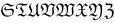
| Fraktur typeface | |
\mathfrak{ABCDEFGHI} |
|
\mathfrak{JKLMNOPQR} |
|
\mathfrak{STUVWXYZ} |
|
\mathfrak{abcdefghijklm} |
|
\mathfrak{nopqrstuvwxyz} |
|
\mathfrak{0123456789} |
|
| Small scriptstyle text | |
{\scriptstyle\text{abcdefghijklm}} |
|














































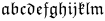



In the above directives, the text-mode layout algorithm is used: spaces and kerning "just work". In addition to the \math...{} font directives, the text-fonts such as \textit{} are also available. The text-fonts are subtly different from their math-font siblings.
Mixed text faces
| Feature | Syntax | How it looks rendered |
|---|---|---|
| Italicised characters (spaces are ignored) | x y z |
|
| Non-italicised characters | \text{x y z} |
|
| Mixed italics (bad) | \text{if} n \text{is even} |
|
| Mixed italics (good) | \text{if }n\text{ is even} |
|
| Mixed italics (alternative: ~ or "\ " forces a space) | \text{if}~n\ \text{is even} |


Color
Equations can use color with the \color command. For example,
| How it looks rendered | Syntax | Feature |
|---|---|---|
{\color{Blue}x^2}+{\color{Orange}2x}-{\color{LimeGreen}1} |
||
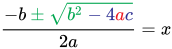
x=\frac{{\color{Blue}-b}\pm\sqrt{\color{Red}b^2-4ac}}{\color{Green}2a} |


The \color command colors all symbols to its right.
However, if the \color command is enclosed in a pair of braces (e.g. {\color{Red}...}) then no symbols outside of those braces are affected.
| How it looks rendered | Syntax | Feature |
|---|---|---|
x\color{red}\neq y=z |
Colors red everything to the right of | |
x\mathrel{\color{red}\neq} y=z |
||
x\color{red}\neq\color{black} y=z |
||
\frac{-b\color{Green}\pm\sqrt{b^2\color{Blue}-4{\color{Red}a}c}}{2a}=x |
The outermost braces in {\color{Red}a}c limit the effect of \color{Red} to the symbol a. Similarly, \color{Blue} does not affect any symbols outside of the \sqrt{} that encloses it, and \color{Green} does not affect any symbols outside of the numerator. |


There are several alternate notation styles.
| How it looks rendered | Syntax | Feature |
|---|---|---|
{\color{Blue}x^2}+{\color{Orange}2x}-{\color{LimeGreen}1} |
works with both texvc and MathJax | |
\color{Blue}x^2\color{Black}+\color{Orange}2x\color{Black}-\color{LimeGreen}1 |
works with both texvc and MathJax | |
\color{Blue}{x^2}+\color{Orange}{2x}-\color{LimeGreen}{1} |
only works with MathJax |


Some color names are predeclared according to the following table, you can use them directly for the rendering of formulas (or for declaring the intended color of the page background).


























Color should not be used as the only way to identify something, because it will become meaningless on black-and-white media or for color-blind people. See WP:Manual of Style (accessibility)#Color.
LaTeX does not have a command for setting the background color. The most effective way of setting a background color is by setting a CSS styling rule for a table cell:
{| class="wikitable" align="center"
| style="background-color: gray;"      | <math>x^2</math>
| style="background-color: Goldenrod;" | <math>y^3</math>
|}
Rendered as:


Custom colors can be defined using:
\definecolor{myorange}{rgb}{1,0.65,0.4}\color{myorange}e^{i \pi}\color{Black} + 1 = 0

Formatting issues
Spacing
TeX handles most spacing automatically, but you may sometimes want manual control.
| Feature | Syntax | How it looks rendered |
|---|---|---|
| double quad space | a \qquad b | |
| quad space | a \quad b | |
| text space | a\ b | |
| text space in text mode | a \text{ } b | |
| large space | a\;b | |
| medium space | a\<b | Not supported |
| small space | a\,b | |
| tiny space (use for multiplication of factors) | ab | |
| tiny space (syntax space ignored) | a b | |
| no space (use for multi-letter variables) | \mathit{ab} | |
| small negative space | a\!b | |
| zero-width space | a\hspace{0pt}b | Not supported |


Automatic spacing may be broken in very long expressions (because they produce an overfull hbox in TeX):
0+1+2+3+4+5+6+7+8+9+10+11+12+13+14+15+16+17+18+19+20+\cdots

This can be remedied by putting a pair of braces { } around the whole expression:
{0+1+2+3+4+5+6+7+8+9+10+11+12+13+14+15+16+17+18+19+20+\cdots}

When relational symbols such as are employed as ordinary symbols, for example in bra–ket notation, additional spacing may have to be avoided:

| Feature | Syntax | How it looks rendered |
|---|---|---|
| without special formatting | | \uparrow \rangle |
|
| explicit opening and closing delimiter | \left| \uparrow \right\rangle |
|
| with additional braces | | {\uparrow} \rangle |
|
| arrow as ordinary symbol | | \mathord\uparrow \rangle |


Empty horizontal or vertical spacing
The phantom commands create empty horizontal and/or vertical space the same height and/or width of the argument.
| Feature | Syntax | How it looks rendered |
|---|---|---|
| Empty horizontal and vertical spacing | \Gamma^{\phantom{i}j}_{i\phantom{j}k} |
|
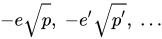
| Empty vertical spacing | -e\sqrt{\vphantom{p'}p},\; -e'\sqrt{p'},\; \ldots |
|
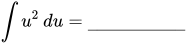
| Empty horizontal spacing | \int u^2\,du=\underline{\hphantom{(2/3)u^3+C}} |

Alignment with normal text flow
Because of the default CSS
img.tex { vertical-align: middle; }
an inline expression like should look good.

If you need to align it otherwise, use <math style="vertical-align:-100%;">...</math> and play with the vertical-align argument until you get it right; however, how it looks may depend on the browser and the browser settings.
If you rely on this workaround, if and when the rendering on the server gets fixed in a future release, this extra manual offset will suddenly make every affected formula align incorrectly. So use it sparingly, if at all.
Unimplemented elements and workarounds
The Math extension works by translating a LaTeX input to MathML and then optionally using MathJax 3 to render the MathML. As a result both the translator and MathJax can cause an equation to error out, with the feature appearing unimplemented. The authors of the Math extension try to make sure that every error is found in the "translating" step, so it is used even if not needed as a safety check. (Because MathJax's own tranlator is not used in any point, their list of differences cannot be used to predict whether an expression can be displayed through the Math extension.)
The full grammar for the subset of (La)TeX allowed by the current WikiTexVC checker can be found in parser.pegjs. This subset is much more restrictive than the MathJax subset, so do expect to see things that work in MathJax fail to work here. As the name suggests, it mostly implements the dialect accepted by texvc, representative of what was considered "enough" for LaTeX on the web circa 2007.
Special integral operators
The following integral operators that are not supported by the default font of MathJax 2.7 are available:
\oiint, \oiiint, \ointctrclockwise, \varointclockwise, \intbar, \intBar
They have poor horizontal spacing, generate cropped SVG images unless used with other tall characters, and appear different from the usual integral symbol \int:
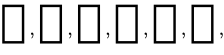
cf. phab:T348587. However, they render fine when MathML is used.
\oiint and \oiiint
Elements which are not yet implemented are \oiint, namely a two-fold integral \iint () with a circular curve through the centre of the two integrals, and similarly \oiiint, a circular curve through three integrals. In contrast, \oint () exists for the single dimension (integration over a curved line within a plane or any space with higher dimension).


These elements appear in many contexts: \oiint denotes a surface integral over the closed 2d boundary of a 3d region (which occurs in much of 3d vector calculus and physical applications – like Maxwell's equations), likewise \oiiint denotes integration over the closed 3d boundary (surface volume) of a 4d region, and they would be strong candidates for the next TeX version. As such there are a lot of workarounds in the present version.
\oiintand\oiiintusing currently implemented symbols\oiintlooks like:- , which uses
\iintalong with\subsetand\supset(overdrawn after backspacing):
\iint\limits_{S}\!\!\!\!\!\!\!\!\!\!\!\subset\!\supset \mathbf D \cdot \mathrm{d}\mathbf A
- , which uses
\inttwice (with some backward kerning) along with\bigcirc(also overdrawn after backpacing) to produce a more consistent circle:
\int\!\!\!\!\int_{\partial V}\!\!\!\!\!\!\!\!\!\!\!\!\!\!\!\!\!\;\;\;\bigcirc\,\,\mathbf D\cdot\mathrm{d}\mathbf A
\oiiint(should also be preferably more tightly kerned) looks more or less like:- which uses three \int symbols (with more backward kerning) with \subset and \supset (overdrawn after backspacing):
\int\!\!\!\!\!\int\!\!\!\!\!\int_{\partial V}\!\!\!\!\!\!\!\!\!\!\!\!\!\!\!\!\!\!\!\;\;\;\subset\!\supset \mathbf D\;\cdot\mathrm{d}\mathbf A
- , which uses three
\intsymbols (with more backward kerning) along with\bigcirc(also overdrawn after backspacing):
\int\!\!\!\!\!\int\!\!\!\!\!\int_{\partial V}\!\!\!\!\!\!\!\!\!\!\!\!\!\!\!\!\!\;\;\;\bigcirc\,\,\mathbf D\;\cdot\mathrm{d}\mathbf A
- , which uses

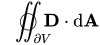
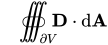
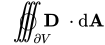
However, since no standardisation exists as yet, any workaround like this (which uses many \! symbols for backspacing) should be avoided, if possible. See below for a possibility using PNG image enforcement.
Note that \iint (the double integral) and \iiint (the triple integral) are still not kerned as they should preferably be, and are currently rendered as if they were successive \int symbols; this is not a major problem for reading the formulas, even if the integral symbols before the last one do not have bounds, so it's best to avoid backspacing "hacks" as they may be inconsistent with a possible future better implementation of integrals symbols (with more precisely computed kerning positions).
\oiint and \oiiint as PNG images
These symbols are available as PNG images which are also integrated into two templates, {{oiint}} and {{oiiint}}, which take care of the formatting around the symbols.
The templates have three parameters:
- preintegral
- the text or formula immediately before the integral
- intsubscpt
- the subscript below the integral
- integrand
- the text or formula immediately after the integral
Examples
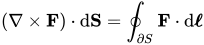
- Stokes' theorem:
{{oiint
| intsubscpt = <math>\scriptstyle S</math>
| integrand = <math>( \nabla \times \mathbf{F} ) \cdot {\mathrm d}\mathbf{S} = \oint_{\partial S} \mathbf{F} \cdot {\mathrm d}\boldsymbol{\ell}</math>
}}

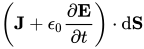
- Ampère's law + correction:
{{oiint
| preintegral = <math>\oint_C \mathbf{B} \cdot {\mathrm d} \boldsymbol{\ell} = \mu_0 </math>
| intsubscpt = <math>{\scriptstyle S}</math>
| integrand = <math>\left ( \mathbf{J} + \epsilon_0\frac{\partial \mathbf{E}}{\partial t} \right ) \cdot {\mathrm d}\mathbf{S}</math>
}}
- Continuity of 4-momentum flux (in general relativity):[3]
{{oiiint
| preintegral = <math>\mathbf{P} = </math>
| intsubscpt = <math>\scriptstyle \partial \Omega</math>
| integrand = <math>\mathbf{T} \cdot {\mathrm d}^3\boldsymbol{\Sigma}</math> <math>=0</math>
}}






Oriented \oiint and \oiiint as PNG images
Some variants of \oiint and \oiiint have arrows on them to indicate the sense of integration, such as a line integral around a closed curve in the clockwise sense, and higher dimensional analogues. These are not implemented in TeX on Wikipedia either, although the template {{intorient}} is available - see link for details.
Arc notation \overarc
\overarc is not yet implemented to display the arc notation. However, there exists a workaround: use \overset{\frown}{AB}, which gives
For longer arcs, use {{Overarc}}:
3.142857
Triple dot \dddot
\dddot is not implemented. For a workaround use \overset{...}{x}, which gives
.

Starred operatorname \operatorname*
The starred version of \operatorname is not currently supported. A workaround for
\operatorname*{median}_{j\,\ne\,i} X_{i,j}
is either
\operatorname{\underset{\mathit{j\,\ne\,i}}{median}} X_{i,j}
or
\mathop{\operatorname{median}}\limits_{j\,\ne\,i} X_{i,j}
Strikethrough
Strikethrough like \sout or \st is not implemented, nor is overlapping like \rlap. This means struck characters like ƛ are difficult to type, except the hardcoded \hbar. A workaround suffix for a normal strikethrough is q \!\!\!\frac{}{\ }, and for elevated strikethrough is \lambda \!\!\!^{{}^\underline{\ \ }}, which give

Formatting in \text
Formatting in \text is not supported. In other words, you cannot use:
\text{\textsf{textual description of a variable}}
but have to use:
\mathsf{textual\ description\ of\ a\ variable}
More specifically, in Mathoid's MathJax, no processing is done to the contents of \text at all. The texvcjs component blocks the use of macros, but another way this behavior leaks through is in the processing of quotation marks, where the Unicode version must be used instead of `:
\text{`failed ``ascii'' quotes'},\ \text{‘okay “unicode” quotes’}

It is currently impossible to get straight (typewriter) quotes in MathJax.
A similar but not-quite-related issue is that there is also no such thing as a "bold sans-serif" because formatting macros cannot be nested.
\textsf{\textbf{I\ hope\ this\ is\ bold\ sf}}
Automatic line-breaking
The current image-based implementation precludes automatic line-breaking of inline formulae after binary operators and "=" as seen in TeX. The only workarounds are to not write long formulae inline, or to split the formula into separate parts at each acceptable break point.
Readers wishing to enable automatic line-breaking can try to have the browser render the MathML itself or to use an alternate in-browser renderer.
Unicode characters
Non-ASCII Unicode characters like π work in MathML, but not in Mathoid (server-side MathJax in SVG/PNG mode, after validation by texvcjs). They should be avoided for maximum compatibility.
MathJax itself supports Unicode characters in \text{}, but the texvcjs validator insists on blocking them (replicating old texvc behavior). A formal feature request and discussion is required to fix this.
Inline framed box
TeX has \fbox{} for putting text in a box, and LaTeX+AMSMath has \boxed{} where the inside is instead in math mode. Both are supported by MathJax, but neither is supported by Mathoid for some reason (possibly another one of those texvc bug-compatible featues). There is no workaround except using a different way to emphasize a part of your formula.
Syntax to avoid
Invisible Unicode characters
A rare but very frustrating cause of inexplicable syntax errors is invisible Unicode characters copied from some other source. For example, the Windows Calculator includes Unicode Bidirectional text control characters in its output: U+202D (left-to-right override) at the beginning and U+202C (pop directional formatting) at the end. These characters can be invisibly pasted into the Wikipedia editor, but will cause Failed to parse (syntax error): messages from the LaTeX renderer, despite the source appearing to be correct. It can usually be fixed by deleting and manually retyping the beginning and end of the pasted text.
Long variable names in math mode
In LaTeX (and compatible implementations such as MathJax), the math mode is designed with the assumption that variable names should be single letters. Breaking the rule causes visibly bad kerning, such as in . To work around this problem, either avoid using these kinds of variable names, or surround them with a typeface or text directive such as \mathit{WorkTab} (see § Alphabets and typefaces above). If a function name is intended, use \operatorname{func}.


Deprecated syntax
The texvc processor accepted some non-standard control sequences. These are now deprecated for Wikipedia use because the MathJax-based renderers do not support them. This is part of an effort to update the math engine. See mw:Extension:Math/Roadmap for details. A bot User:Texvc2LaTeXBot will replace this syntax on the English Wikipedia.
| texvc syntax | Suggested replacement | Comment |
|---|---|---|
| $ | \$ | redefinition would involve changing the character code |
| % | \% | redefinition would involve changing the character code |
| \or | \lor | causes the teubner TeX package to fail[4] |
| \and | \land | causes normal align environment to fail |
| \pagecolor | (remove) | not needed and not working anymore, done manually |
| \part | \partial | acceptable if the document doesn't use sectioning with \part. |
| \ang | \angle | this only conflicts with siunitx package. |
| \C | \Complex | conflicts with puenc.def e.g. from hyperref package |
| \H | \mathbb{H} | conflicts with text command \H{o}, which is ő. |
| \bold | \mathbf | |
| \Bbb | \mathbb |
Chemistry
There are three ways to render chemical sum formulas as used in chemical equations:
<chem>...</chem>(<ce>...</ce>is a deprecated alias for it)<math chem>...</math>{{chem}}and{{chem2}}
<chem>X</chem> is short for <math chem>\ce{X}</math>(where Technically, <math chem> is a math tag with the extension mhchem enabled, according to the MathJax documentation.
Wikipedia:Manual of Style/Chemistry advises avoiding the <chem> and <math chem> markup methods when possible.
Note that the commands \cee and \cf are disabled, because they are marked as deprecated in the mhchem LaTeX package documentation.
If the formula reaches a certain "complexity", spaces might be ignored (<chem>A + B</chem> might be rendered as if it were <chem>A+B</chem> with a positive charge). In that case, write <chem>A{} + B</chem> (and not <chem>{A} + {B}</chem> as was previously suggested). This will allow auto-cleaning of formulas once the bug is fixed and/or a newer version of mhchem is available.
Please note that there are still major issues with mhchem support in MediaWiki. Some issues can be solved by enabling the extension using <math chem> and formatting individual items with \ce. For example,
<math chem>\ce{pIC_{50}} = -\log_{10} \ce{(IC_{50})}</math>
![{\displaystyle {p\,\mathrm {IC} {\vphantom {A}}_{\smash[{t}]{50}}}=-\log _{10}{(\mathrm {IC} {\vphantom {A}}_{\smash[{t}]{50}})}}](https://wikimedia.org/api/rest_v1/media/math/render/svg/0ea65306461d194db53b0cb6d8a0b48937915c00)
Molecular and condensed formula
| mhchem | {{chem}} | {{chem2}} | Equivalent HTML | ||||||||||||||||||||||||||||||||
|---|---|---|---|---|---|---|---|---|---|---|---|---|---|---|---|---|---|---|---|---|---|---|---|---|---|---|---|---|---|---|---|---|---|---|---|
|
|
|
|
![{\displaystyle {\mathrm {H} {\vphantom {A}}_{\smash[{t}]{2}}\mathrm {O} }}](https://wikimedia.org/api/rest_v1/media/math/render/svg/373648858d1d59d300f88386b46dd95e01f04c5a)
![{\displaystyle {\mathrm {Sb} {\vphantom {A}}_{\smash[{t}]{2}}\mathrm {O} {\vphantom {A}}_{\smash[{t}]{3}}}}](https://wikimedia.org/api/rest_v1/media/math/render/svg/eb4d8081a6e7e5f1eba95c6958722b511a3b6e2b)
![{\displaystyle {(\mathrm {NH} {\vphantom {A}}_{\smash[{t}]{4}}){\vphantom {A}}_{\smash[{t}]{2}}\mathrm {S} }}](https://wikimedia.org/api/rest_v1/media/math/render/svg/b3db28a1bd8d78037b2d2c7c2d9280bec66b7fee)
Bonds
| mhchem | Equivalent {{chem}} and HTML | {{chem2}} | ||||||||||||||||||
|---|---|---|---|---|---|---|---|---|---|---|---|---|---|---|---|---|---|---|---|---|
|
|
|
![{\displaystyle {\mathrm {C} {\vphantom {A}}_{\smash[{t}]{6}}\mathrm {H} {\vphantom {A}}_{\smash[{t}]{5}}{-}\mathrm {CHO} }}](https://wikimedia.org/api/rest_v1/media/math/render/svg/8435c2507fe927c7129e593d933724df23353f93)

Charges
| mhchem | {{chem}} | {{chem2}} | Equivalent HTML | ||||||||||||||||||||||||||||||||||||||||||||||||||||||||
|---|---|---|---|---|---|---|---|---|---|---|---|---|---|---|---|---|---|---|---|---|---|---|---|---|---|---|---|---|---|---|---|---|---|---|---|---|---|---|---|---|---|---|---|---|---|---|---|---|---|---|---|---|---|---|---|---|---|---|---|
|
|
|
|

![{\displaystyle {\mathrm {NO} {\vphantom {A}}_{\smash[{t}]{3}}{\vphantom {A}}^{-}}}](https://wikimedia.org/api/rest_v1/media/math/render/svg/02e54ddd1b0acf2c3e42d87536ab09fab46126d4)
![{\displaystyle {\mathrm {CrO} {\vphantom {A}}_{\smash[{t}]{4}}{\vphantom {A}}^{2-}}}](https://wikimedia.org/api/rest_v1/media/math/render/svg/6dc0bb99de334b2feb0e1e47c942f67119121643)
![{\displaystyle {\mathrm {AgCl} {\vphantom {A}}_{\smash[{t}]{2}}{\vphantom {A}}^{-}}}](https://wikimedia.org/api/rest_v1/media/math/render/svg/0d591eda1af49e75593fa8bb102cf29ff68ae675)
![{\displaystyle {[\mathrm {AgCl} {\vphantom {A}}_{\smash[{t}]{2}}]{\vphantom {A}}^{-}}}](https://wikimedia.org/api/rest_v1/media/math/render/svg/05e7091d037f75d840bfe2e759043d37ee81a4b8)


Addition compounds and stoichiometric numbers
| mhchem | {{chem}} | {{chem2}} | ||||||||||||||||||||||||||||||
|---|---|---|---|---|---|---|---|---|---|---|---|---|---|---|---|---|---|---|---|---|---|---|---|---|---|---|---|---|---|---|---|---|
|
|
|
![{\displaystyle {\mathrm {MgSO} {\vphantom {A}}_{\smash[{t}]{4}}\,{\cdot }\,7\,\mathrm {H} {\vphantom {A}}_{\smash[{t}]{2}}\mathrm {O} }}](https://wikimedia.org/api/rest_v1/media/math/render/svg/9f0801e57fbe2700e474522acb3b08a04448186f)
![{\displaystyle {\mathrm {KCr} (\mathrm {SO} {\vphantom {A}}_{\smash[{t}]{4}}){\vphantom {A}}_{\smash[{t}]{2}}\,{\cdot }\,12\,\mathrm {H} {\vphantom {A}}_{\smash[{t}]{2}}\mathrm {O} }}](https://wikimedia.org/api/rest_v1/media/math/render/svg/6ce69af8634b3c89050142f6ab064ebf31c5dd17)
![{\displaystyle {\mathrm {CaSO} {\vphantom {A}}_{\smash[{t}]{4}}\,{\cdot }\,{\mathchoice {\textstyle {\frac {1}{2}}}{\frac {1}{2}}{\frac {1}{2}}{\frac {1}{2}}}\,\mathrm {H} {\vphantom {A}}_{\smash[{t}]{2}}\mathrm {O} {}+{}1\!{\mathchoice {\textstyle {\frac {1}{2}}}{\frac {1}{2}}{\frac {1}{2}}{\frac {1}{2}}}\,\mathrm {H} {\vphantom {A}}_{\smash[{t}]{2}}\mathrm {O} {}\mathrel {\longrightarrow } {}\mathrm {CaSO} {\vphantom {A}}_{\smash[{t}]{4}}\,{\cdot }\,2\,\mathrm {H} {\vphantom {A}}_{\smash[{t}]{2}}\mathrm {O} }}](https://wikimedia.org/api/rest_v1/media/math/render/svg/d0cb858281ddb398822be7fb2e7bed0156752c1f)
![{\displaystyle {{\mathchoice {\textstyle {\frac {25}{2}}}{\frac {25}{2}}{\frac {25}{2}}{\frac {25}{2}}}\,\mathrm {O} {\vphantom {A}}_{\smash[{t}]{2}}{}+{}\mathrm {C} {\vphantom {A}}_{\smash[{t}]{8}}\mathrm {H} {\vphantom {A}}_{\smash[{t}]{18}}{}\mathrel {\longrightarrow } {}8\,\mathrm {CO} {\vphantom {A}}_{\smash[{t}]{2}}{}+{}9\,\mathrm {H} {\vphantom {A}}_{\smash[{t}]{2}}\mathrm {O} }}](https://wikimedia.org/api/rest_v1/media/math/render/svg/f73a96de1b4649f2d2403a7ead5e3abc8c607b7e)
Wiki linking
{{chem}} |
| ||||
|---|---|---|---|---|---|
{{chem2}} |
|
(Italic) Math
| mhchem |
| ||||
|---|---|---|---|---|---|
{{chem}} |
| ||||
{{chem2}} |
|
![{\displaystyle {{\mathrm {C_{\mathit {x}}H_{\mathit {y}}} }{}+{}{\mathit {z}}\mathrm {O} {\vphantom {A}}_{\smash[{t}]{2}}{}\mathrel {\longrightarrow } {}{\mathit {x}}\mathrm {CO} {\vphantom {A}}_{\smash[{t}]{2}}{}+{}{\frac {\mathit {y}}{2}}\mathrm {H} {\vphantom {A}}_{\smash[{t}]{2}}\mathrm {O} }}](https://wikimedia.org/api/rest_v1/media/math/render/svg/59eedb9f2cacdc718082078ff935af6f74f28546)
Upright text
| mhchem |
|
|---|
![{\displaystyle {{{\text{Gluconic}}\ {\text{Acid}}}{}+{}\mathrm {H} {\vphantom {A}}_{\smash[{t}]{2}}\mathrm {O} {\vphantom {A}}_{\smash[{t}]{2}}}}](https://wikimedia.org/api/rest_v1/media/math/render/svg/86c321a13be3cd1f1970d3ca453f82a52e363e32)
Oxidation states
| mhchem |
| ||||
|---|---|---|---|---|---|
{{chem}} with <sup>...</sup> |
| ||||
{{chem2}} |
|
![{\displaystyle {\mathrm {Fe} {\vphantom {A}}^{\mathrm {II} }\mathrm {Fe} {\vphantom {A}}^{\mathrm {III} }{\vphantom {A}}_{\smash[{t}]{2}}\mathrm {O} {\vphantom {A}}_{\smash[{t}]{4}}}}](https://wikimedia.org/api/rest_v1/media/math/render/svg/9156733e38a48aab48693dbb461d6580af79c8b8)
Greek characters
| mhchem | Equivalent {{chem}} and HTML | {{chem2}} | ||||||||||||||||||
|---|---|---|---|---|---|---|---|---|---|---|---|---|---|---|---|---|---|---|---|---|
|
|
|

![{\displaystyle {[\mathrm {Fe} (\mathrm {\eta } {\vphantom {A}}^{5}{\text{-}}\mathrm {C} {\vphantom {A}}_{\smash[{t}]{5}}\mathrm {H} {\vphantom {A}}_{\smash[{t}]{5}}){\vphantom {A}}_{\smash[{t}]{2}}]}}](https://wikimedia.org/api/rest_v1/media/math/render/svg/223bb3e6afc787238e9493f63b468360da2884bf)
Isotopes
| mhchem | Equivalent {{chem}} and HTML | ||||||||||||
|---|---|---|---|---|---|---|---|---|---|---|---|---|---|
|
|
![{\displaystyle {{\vphantom {A}}_{\hphantom {90}}^{\hphantom {227}}{\mkern {-1.5mu}}{\vphantom {A}}_{{\vphantom {2}}{\llap {\smash[{t}]{90}}}}^{{\smash[{t}]{\vphantom {2}}}{\llap {227}}}\mathrm {Th} {\vphantom {A}}^{+}}}](https://wikimedia.org/api/rest_v1/media/math/render/svg/1335877af9156621b8926eeb2d495e0e24a8c831)
![{\displaystyle {{\vphantom {A}}_{\hphantom {-1}}^{\hphantom {0}}{\mkern {-1.5mu}}{\vphantom {A}}_{{\vphantom {2}}{\llap {\smash[{t}]{-1}}}}^{{\smash[{t}]{\vphantom {2}}}{\llap {0}}}\mathrm {n} {\vphantom {A}}^{-}}}](https://wikimedia.org/api/rest_v1/media/math/render/svg/fbd3b63ad15d73416fcf5e61e4c871274f5cde92)
States
Subscripting states is not an IUPAC recommendation.
| mhchem | {{chem}} | ||||||||||||
|---|---|---|---|---|---|---|---|---|---|---|---|---|---|
|
|
![{\displaystyle {\mathrm {H} {\vphantom {A}}_{\smash[{t}]{2}}{\vphantom {A}}_{\smash[{t}]{{\mskip {1mu}}(\mathrm {aq} )}}}}](https://wikimedia.org/api/rest_v1/media/math/render/svg/3f1ccdf06f51e906d4778bdd923f4db4fcc19bd3)
![{\displaystyle {\mathrm {CO} {\vphantom {A}}_{\smash[{t}]{3}}{\vphantom {A}}^{2-}{\mskip {2mu}}(\mathrm {aq} )}}](https://wikimedia.org/api/rest_v1/media/math/render/svg/b8246e73424b4d53294b4db3e036a7da8265b644)
Precipitate and gas formation
| mhchem |
| ||||
|---|---|---|---|---|---|
{{chem}} |
| ||||
{{chem2}} |
| ||||
| Equivalent HTML |
| ||||
| mhchem |
|
![{\displaystyle {\mathrm {Ba} {\vphantom {A}}^{2+}{}+{}\mathrm {SO} {\vphantom {A}}_{\smash[{t}]{4}}{\vphantom {A}}^{2-}{}\mathrel {\longrightarrow } {}\mathrm {BaSO} {\vphantom {A}}_{\smash[{t}]{4}}{\mskip {2mu}}(\mathrm {v} )}}](https://wikimedia.org/api/rest_v1/media/math/render/svg/230b643a2c41d475177530057a715e05adaceb5c)
![{\displaystyle {2\,\mathrm {HCl} {}+{}\mathrm {Zn} {}\mathrel {\longrightarrow } {}\mathrm {ZnCl} {\vphantom {A}}_{\smash[{t}]{2}}{}+{}\mathrm {H} {\vphantom {A}}_{\smash[{t}]{2}}\uparrow {}}}](https://wikimedia.org/api/rest_v1/media/math/render/svg/cc5014e2744d4ce85c0e706fb68facdb76f6871d)
Reaction arrows
| Markup | Renders as |
|---|---|
<chem>A -> B</chem> |
|
<chem>A <- B</chem> |
|
<chem>A <-> B</chem> |
|
<chem>A <--> B</chem> |
Unsupported[a] |
<chem>A <=> B</chem> |
|
<chem>A <=>> B</chem> |
|
<chem>A <<=> B</chem> |
|
{{#parsoid |
|
{{#parsoid |
|
{{#parsoid |
|


![{\displaystyle {\mathrm {A} {}\mathrel {\xrightarrow[{\text{text below}}]{\text{text above}}} {}\mathrm {B} }}](https://wikimedia.org/api/rest_v1/media/math/render/svg/1c4298e79e43789e1e847e4aba3885e82120b264)
![{\displaystyle {\mathrm {A} {}\mathrel {\xrightarrow {{+}\,\mathrm {H} {\vphantom {A}}_{\smash[{t}]{2}}\mathrm {O} } } {}\mathrm {B} }}](https://wikimedia.org/api/rest_v1/media/math/render/svg/b1ef2dcccc91ee71c0a46e59b9e5b4737ccc7014)
Note, the syntax <chem>A->[{}\atop text] B</chem>,previously used as a workaround, currently causes render errors (as of August 2025). It should be replaced with the simpler syntax, <chem>A->[text] B</chem>.
Comparison of arrow symbols
| Markup | Renders as |
|---|---|
<math>\rightarrow</math> |
|
<math>\rightleftarrows</math> |
|
<math>\rightleftharpoons</math> |
|
<math>\leftrightarrow</math> |
|
<math>\longrightarrow</math> <chem>-></chem> |
|
<math>\rightleftharpoons</math> <chem><=></chem> |
|
<math>\longleftrightarrow</math> <chem><-></chem> |


Further examples using ordinary LaTeX tags
<math chem>\begin{align}
\overbrace{\ce{2Fe3O4}}^{\text{magnetite}} + \ce{1/2 O2 ->}\ &{\color{Brown}\overbrace{\ce{3(\lambda{-}Fe2O3)}}^{\text{maghemite}}}\\
\underbrace{\ce{2Fe3O4}}_{\text{magnetite}} + \ce{1/2 O2 ->}\ &{\color{Red}\underbrace{\ce{3(\alpha{-}Fe2O3)}}_{\text{hematite}}}
\end{align}</math>
![{\displaystyle {\begin{aligned}\overbrace {2\,\mathrm {Fe} {\vphantom {A}}_{\smash[{t}]{3}}\mathrm {O} {\vphantom {A}}_{\smash[{t}]{4}}} ^{\text{magnetite}}+{{\mathchoice {\textstyle {\frac {1}{2}}}{\frac {1}{2}}{\frac {1}{2}}{\frac {1}{2}}}\,\mathrm {O} {\vphantom {A}}_{\smash[{t}]{2}}{}\mathrel {\longrightarrow } {}}\ &{\color {Brown}\overbrace {3\,(\mathrm {\lambda } {\text{-}}\mathrm {Fe} {\vphantom {A}}_{\smash[{t}]{2}}\mathrm {O} {\vphantom {A}}_{\smash[{t}]{3}})} ^{\text{maghemite}}}\\\underbrace {2\,\mathrm {Fe} {\vphantom {A}}_{\smash[{t}]{3}}\mathrm {O} {\vphantom {A}}_{\smash[{t}]{4}}} _{\text{magnetite}}+{{\mathchoice {\textstyle {\frac {1}{2}}}{\frac {1}{2}}{\frac {1}{2}}{\frac {1}{2}}}\,\mathrm {O} {\vphantom {A}}_{\smash[{t}]{2}}{}\mathrel {\longrightarrow } {}}\ &{\color {BrickRed}\underbrace {3\,(\mathrm {\alpha } {\text{-}}\mathrm {Fe} {\vphantom {A}}_{\smash[{t}]{2}}\mathrm {O} {\vphantom {A}}_{\smash[{t}]{3}})} _{\text{hematite}}}\end{aligned}}}](https://wikimedia.org/api/rest_v1/media/math/render/svg/3516eceb7cec5f437cc3139f9ce6fa0ea2b678af)
To align the equations or color them, use <math chem> and \ce.
Commutative diagrams
1 step method
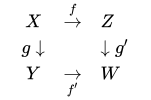
<math>
\begin{array}{lcl}
 & X & \overset{f}\rightarrow & Z & \\
 & g \downarrow && \downarrow g'\\
 & Y & \underset{f'}\rightarrow & W & \\
\end{array}
</math>
3 step method
.svg)
To make a commutative diagram, there are three steps:
- write the diagram in TeX
- convert to SVG
- upload the file to Wikimedia Commons
Diagrams in TeX
Xy-pic[b][5][6] and the tikz-cd[7] wrapper for TikZ[8] are powerful and general-purpose diagram packages in LaTeX. Diagrams created using Xy-pic can be found at Commons: Category:Xy-pic diagrams.
This is the markup for a diagram using the xymatrix syntax of xy-pic:
\usepackage[all]{xy}

\[
\xymatrix{
  A \ar[r]^f \ar[d]_g \ar[dr]^u &
  B \ar[d]^h \\
  C \ar[r]_k &
  D
}
\]
This is the same diagram using the barr syntax of xy-pic
\usepackage[cmtip,all,barr]{xy}
\[
\bfig
\node A(0,0)[A]
\node B(600,0)[B]
\node C(0,-400)[C]
\node D(600,-400)[D]
\arrow[A`B;f]
\arrow[A`C;g]
\arrow[B`D;h]
\arrow[C`D;k]
\arrow[A`D;u]
\efig
\]
This is the same diagram using tikz-cd.
\usepackage{tikz-cd}
\[
\begin{tikzcd}
  A \arrow[r,"f"] \arrow[d,"g"'] \arrow[dr,"u"] &
  B \arrow[d,"h"] \\
  C \arrow[r,"k"'] &
  D
\end{tikzcd}
\]
Simpler packages include:
The following is a template for Xy-pic:
\documentclass[border=10pt]{standalone} % Crop to size, remove page numbers, leave margin
\usepackage[all]{xy} % Loading the XY-Pic package
\begin{document}
\SelectTips{eu}{} % Euler (shorter) arrowheads (tips)
$$
\xymatrix{
%%% Diagram goes here %%%
}
$$
\end{document}
Using postscript drivers may in some cases give smoother curves and will handle fonts differently:
\usepackage[all, ps, dvips]{xy}
Convert to SVG
Once you have produced your diagram in LaTeX (or TeX), you can convert it to an SVG file using the following sequence of commands:
pdflatex file.tex
pdf2svg file.pdf file.svg
The pdfcrop and pdf2svg utilities are needed for this procedure. You can alternatively use pdf2svg from PDFTron for the last step.
If you do not have pdfTeX (which is unlikely) you can use the following commands to replace the first step (TeX → PDF):
latex file.tex
dvipdfm file.dvi
In general, you will not be able to get anywhere with diagrams without TeX and Ghostscript, and the inkscape program is a useful tool for creating or modifying your diagrams by hand. There is also a utility pstoedit which supports direct conversion from Postscript files to many vector graphics formats, but it requires a non-free plugin to convert to SVG, and regardless of the format, this editor has not been successful in using it to convert diagrams with diagonal arrows from TeX-created files.
These programs are:
- a working TeX distribution, such as TeX Live
- Ghostscript
- pstoedit
- Inkscape
Upload the file
As the diagram is your own work, upload it to Wikimedia Commons, so that all projects (notably, all languages) can use it without having to copy it to their language's Wiki. (If you've previously uploaded a file to somewhere other than Commons, to Commons.)
- Check size
- Before uploading, check that the default size of the image is neither too large nor too small by opening in an SVG application and viewing at default size (100% scaling), otherwise adjust the
-yoption todvips. - Name
- Make sure the file has a meaningful name.
- Upload
- Login to Wikimedia Commons, then upload the file; for the Summary, give a brief description.
Now go to the image page and add a description, including the source code, using this template:
{{Information
 |description =
     {{en|1= '''Description [[:en:Link to WP page|topic]]'''}}
 |source = {{own}}, created as per:
  [[:en:Help:Displaying a formula#Commutative diagrams]];
  source code below.
 |date = '''The Creation Date, like 1999-12-31'''
 |author = '''[[User:YourUserName|Your Real Name]]'''
 |permission = {{self|PD-self '''(or [[commons:Licensing#Well-known licenses|other license]])'''
     |author = '''[[User:YourUserName|Your Real Name]]'''}}
}}

====TeX source====

<syntaxhighlight lang="latex">
 % TeX source here
</syntaxhighlight>

[[Category:Commutative diagrams]]
[[Category:Xy-pic diagrams]]
[[Category:Images with LaTeX source code]]
- Source code
- Include the source code in the image page, in the Source section of the
{{Information}}template, so that the diagram can be edited in future. - Include the complete
.texfile, not just the fragment, so future editors do not need to reconstruct a compilable file. - You may optionally make the source code section collapsible, using the
{{cot}}or{{cob}}templates. - (Don't include it in the Summary section, which is just supposed to be a summary.)
- Include the source code in the image page, in the Source section of the
- License
- The most common license for commutative diagrams is
PD-self; some usePD-ineligible, especially for simple diagrams, or other licenses. Please do not use the GFDL, as it requires the entire text of the GFDL to be attached to any document that uses the diagram. - Description
- If possible, link to a Wikipedia page relevant to the diagram. (The
1=is necessary if you use nest templates within the description, and harmless otherwise.) - Category
- Include
[[Category:Commutative diagrams]], so that it appears in commons:Category:Commutative diagrams. There are also subcategories, which you may choose to use. - Include image
- Now include the image on the original page via
[[File:Diagram.svg]]. Use[[File:Diagram.svg|class=skin-invert]]to invert colors in dark mode.
Examples
A sample conforming diagram is commons:File:PSU-PU.svg.
Semantics and links
While links from formulas using LaTeX macros such as \href or \url or are currently not supported, one can link individual math expressions to Wikidata items to explain the meaning of individual terms of mathematical expressions. For example,
| Markup | {{#parsoid |
|---|---|
| Renders as |
links to a special page that displays additional information on that formula. To change the information shown on the special page, navigate to the Wikidata item linked at the bottom of the special page. Use the has part property to link parts of the equation to other Wikidata items with their respective Wikipedia articles. This is not limited to individual identifiers, but can also be used to link more complex terms.
In SVG rendering mode, a condensed version of that special page is shown as a popup. However, in native MathML mode, pop-ups are displayed for individual identifiers.
| Markup | {{#parsoid |
|---|---|
| Renders as |
Examples of implemented TeX formulas
Quadratic polynomial
| Markup | {{#parsoid |
|---|---|
| Renders as |

Quadratic formula
| Markup | {{#parsoid |
|---|---|
| Renders as |
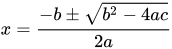
Tall parentheses and fractions
| Markup | {{#parsoid |
|---|---|
| Renders as |
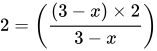
| Markup | {{#parsoid |
|---|---|
| Renders as |
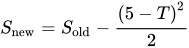
Integrals
| Markup | {{#parsoid |
|---|---|
| Renders as |

| Markup | {{#parsoid |
|---|---|
| Renders as |
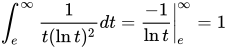
Matrices and determinants
| Markup | {{#parsoid |
|---|---|
| Renders as |

Summation
| Markup | {{#parsoid |
|---|---|
| Renders as |

| Markup | {{#parsoid |
|---|---|
| Renders as |
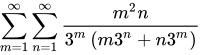
Differential equation
| Markup | {{#parsoid |
|---|---|
| Renders as |

Complex numbers
| Markup | {{#parsoid |
|---|---|
| Renders as |

Limits
| Markup | {{#parsoid |
|---|---|
| Renders as |
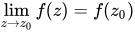
Integral equation
| Markup | {{#parsoid |
|---|---|
| Renders as |
![{\displaystyle \phi _{n}(\kappa )={\frac {1}{4\pi ^{2}\kappa ^{2}}}\int _{0}^{\infty }{\frac {\sin(\kappa R)}{\kappa R}}{\frac {\partial }{\partial R}}\left[R^{2}{\frac {\partial D_{n}(R)}{\partial R}}\right]\,dR}](https://wikimedia.org/api/rest_v1/media/math/render/svg/7f6695154ee0e388c6ea1da20c2e19810282251a)
Example
| Markup | {{#parsoid |
|---|---|
| Renders as |

Continuation and cases
| Markup | {{#parsoid |
|---|---|
| Renders as |
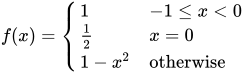
Prefixed subscript
| Markup | {{#parsoid |
|---|---|
| Renders as |

Fraction and small fraction
| Markup | {{#parsoid |
|---|---|
| Renders as |

Area of a quadrilateral
| Markup | {{#parsoid |
|---|---|
| Renders as |

Volume of a spherical frustum
| Markup | {{#parsoid |
|---|---|
| Renders as |
![{\displaystyle V={\frac {1}{6}}\pi h\left[3\left(r_{1}^{2}+r_{2}^{2}\right)+h^{2}\right]}](https://wikimedia.org/api/rest_v1/media/math/render/svg/480eb74247c5f48886e4558d4eb5dd09e6649745)
Multiple equations
The altered newline code \\[0.6ex] below adds a vertical space between the two lines of length equal to times the height of a single 'x' character.

| Markup | {{#parsoid |
|---|---|
| Renders as |
![{\displaystyle {\begin{aligned}u&={\tfrac {1}{\sqrt {2}}}(x+y)\qquad &x&={\tfrac {1}{\sqrt {2}}}(u+v)\\[0.6ex]v&={\tfrac {1}{\sqrt {2}}}(x-y)\qquad &y&={\tfrac {1}{\sqrt {2}}}(u-v)\end{aligned}}}](https://wikimedia.org/api/rest_v1/media/math/render/svg/4e0308a3a70f9d0b044c9dd0541c27a130ddbeac)
See also
- {{Math}}
<math>- MathJax – Javascript library that converts LaTeX to MathML
- Typesetting of mathematical formulas
- Help:Score (a tag for tablatures, "sheet music") and Help:Musical symbols
- List of mathematical symbols
- WP:Rendering math
- blahtex: a LaTeX to MathML converter for Wikipedia
- commons:Category:Images which should use TeX
- Handwriting recognition – another way to put formulas, in a visual manner
- WP:Manual of Style/Mathematics
References
Footnotes

Citations
- ↑
- ↑ "HTML Living Standard". Web Hypertext Application Technology Working Group (WHATWG).
- ↑ J. A. Wheeler; C. Misner; K. S. Thorne (1973). Gravitation (2nd ed.). W. H. Freeman & Co. ISBN 0-7167-0344-0.
- ↑ "Redefine \or form within a nested if statement? - TeX - LaTeX Stack Exchange".
- ↑ Michael Barr. "diagxy: Barr's front-end for Xy-pic". CTAN. Retrieved 2026-04-27.
- ↑ "Xy-pic UserÔÇÖs Guide". LORIA. Retrieved 2026-04-27.
- ↑ Augusto Stoffel. "tikz-cd: Commutative diagrams with TikZ". CTAN. Retrieved 2026-04-27.
- ↑ "The TikZ and PGF Manual". CTAN. Retrieved 2026-04-27.
External links
- Task:Creating a visual VisualEditor plugin tool to add/edit maths blocks in Wikimedia Phabricator
- A LaTeX tutorial
- LaTex online editor
- Doob, Michael, A Gentle Introduction to TeX: A Manual for Self-study (PDF). A paper introducing TeX — see page 39 onwards for a good introduction to the maths side of things.
- Oetiker, Tobias; Partl, Hubert; Hyna, Irene; Schlegl, Elisabeth (December 13, 2009), The Not So Short Introduction to LaTeX 2ε (PDF) (4.27 ed.). A paper introducing LaTeX — skip to page 49 for the math section. See page 63 for a complete reference list of symbols included in LaTeX and AMS-LaTeX.
- The Comprehensive LaTeX Symbol List—symbols not found here may be documented there.
- The esint package for closed double integrals
- AMS-LaTeX guide.
- "Handwriting Recognition". Mathpix. Optical character recognition of handwritten mathematical formulas into LaTeX and other formats, offering 10 free snips a month (registration required).
- cancel package homepage and PDF documentation
- A set of public domain fixed-size math symbol bitmaps.
- List of mathematical symbols with their Unicode characters and their LaTeX commands
- MathML: A product of the W3C Math working group, is a low-level specification for describing mathematics as a basis for machine-to-machine communication
- HTML Math and the <MATH> tag, W3C.